BBCAM202 - How To Factory Reset
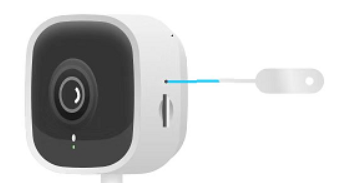
Locate the reset button hole on the side of the camera, hold it for about 8 seconds until the camera announces a factory reset, then re-add it in the Tapo app once the status LED alternates green and red.
Performing a factory reset on your Bird Box camera will reset all parameters back to default, including the Wi-Fi settings and password. Once you have completed a factory reset, the camera will need to be set up again with your Wi-Fi Router.
Step 1
If you still have the camera loaded in the Tapo app then you need to remove it. You can do this by tapping on the camera's icon in the app, then tap 'Remove'.
Step 2
Plug your camera in and allow it a couple of minutes to boot up.
Step 3
Locate the reset button hole on the side of the camera. You will need a small tool, such as a bent-out paperclip, to insert in the hole and press the reset button. You will feel a slight click of the button when you press it.
Step 4
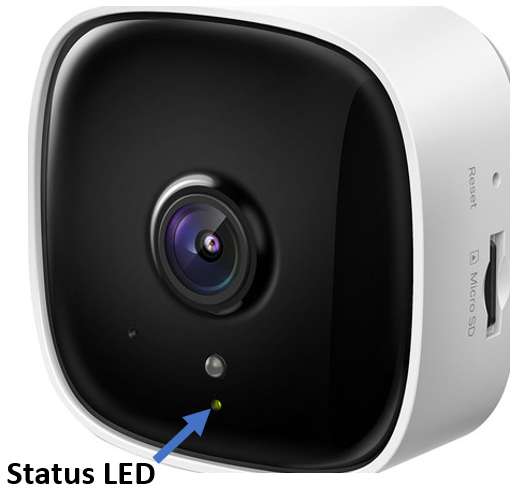
Press and hold the reset button for about 8 seconds. The camera should announce it is doing a factory reset and the status LED on the front will start rapidly blinking red.
Step 5
Allow the camera a couple of minutes to boot back up again. The camera will be reset as new.
Step 6
Check the status LED on the front of the camera. Once the camera has been fully reset the LED will alternate slowly between green and red. This confirms the camera is ready for setup.
If your camera is mounted in a box, you may be able to see the status LED through the entrance hole.
If the camera status LED is not alternating between green and red, check the power supply is connected and try Step 4 again.
Step 7
Now that the camera has been reset, you will need to add it again in the Tapo app. Open the app and tap the '+' icon, then 'Add Device', then 'Indoor Cameras', then 'TC60'. The app will guide you through the rest of the adding process to get your camera connected to your router.
Products this applies to
 Best For Beginners
Wi-Fi Bird Nest Box Camera Kit - BBCAM202
One of the best value for money Wi-Fi bird box cameras on the market!Ever wondered exactly what's going on in your bird box? Maybe you're looking for the per...
 Plug And Play
Bird Nesting Box With Built In Wi-Fi Camera
Bird Nesting box with built in HD WiFi camera! This is a complete kit that includes a 10M power cable, mains power supply, and 8GB memory card, all fitted an...